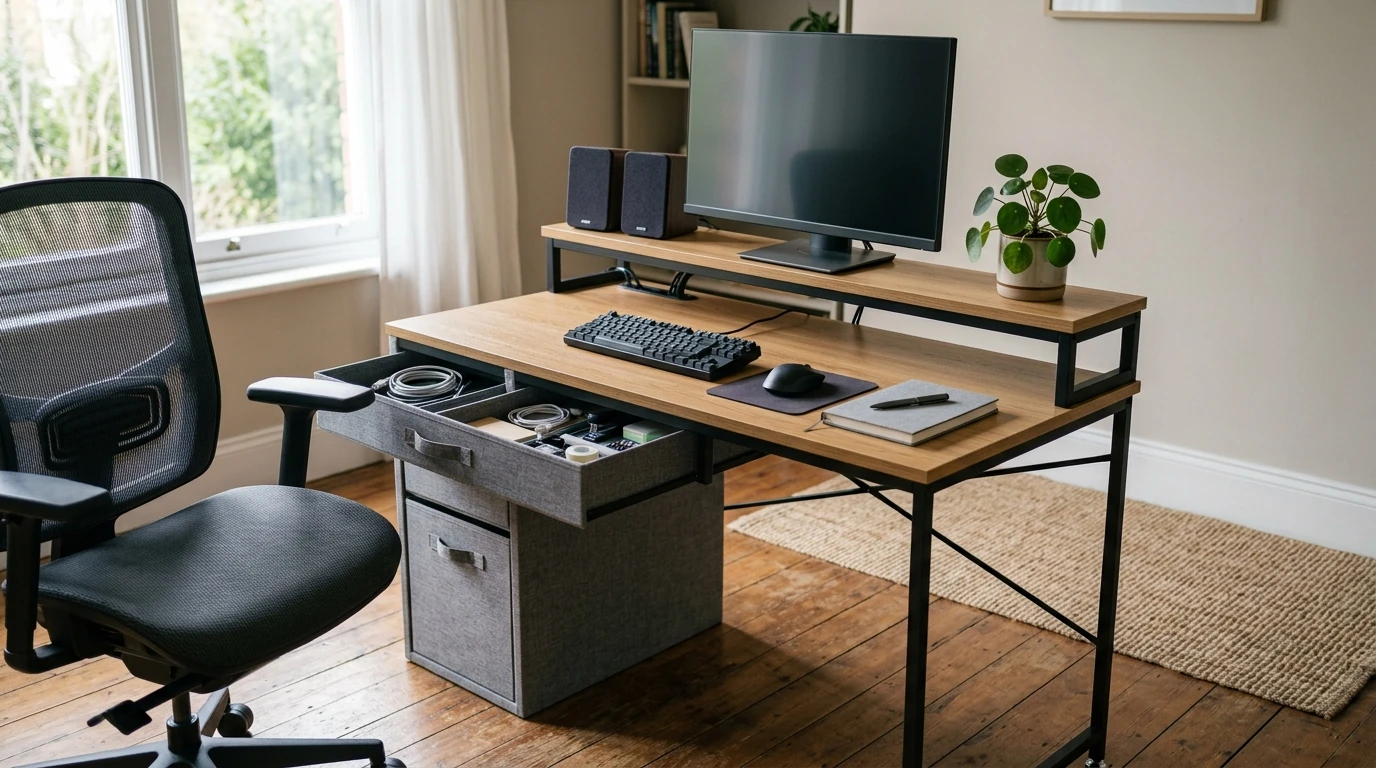
A compact workstation can still feel spacious when the layout is intentional. A 48-inch double-deck desk combines a two-tier surface with fabric drawers for quick-access storage, while adjustable feet help keep the desk steady on uneven floors—useful for home offices, bedrooms, dorms, and small studios. The result is a setup that supports focused work, reduces surface clutter, and makes it easier to keep daily essentials exactly where you want them.
The biggest benefit of a double-deck design is visual and functional separation. Instead of stacking everything on one plane, you get “zones” that make routines smoother and clean-up faster.
For posture and workstation setup basics, practical guidance from OSHA’s Computer Workstations eTool and NIOSH ergonomic guidelines can help you fine-tune monitor height, keyboard placement, and overall comfort.
Fabric drawers are a simple way to add storage without turning a compact desk into a heavy, bulky workstation. Because they’re lightweight and flexible, they’re also easier to live with in tight spaces where you might rearrange your layout seasonally or between semesters.
| Use case | Drawer 1 | Drawer 2 | Bonus tip |
|---|---|---|---|
| Remote work | Chargers, power bank, adapters | Pens, sticky notes, highlighters | Add a small cable pouch to prevent tangles |
| Student setup | Calculator, flashcards, earbuds | Extra pencils, index cards, tape | Keep a small timer on the upper shelf |
| Gaming/streaming | Controller, batteries, dongles | Wipes, microfiber cloth, spare mouse skates | Route cables behind the upper deck for a cleaner look |
| Crafts | Cutters, rulers, measuring tape | Glue, clips, markers | Use drawer dividers or small tins to separate tiny parts |
Most rooms look level until you place furniture and feel a wobble when typing. Adjustable feet are a practical detail that makes a difference the moment you start using the desk daily.
A 48-inch width often hits a sweet spot: big enough to feel like a dedicated workstation, compact enough to slide into multi-purpose rooms. Planning the placement first helps avoid common annoyances like blocked outlets, cramped chair movement, or a monitor that sits too close.
| What to measure | Why it matters | Simple guideline |
|---|---|---|
| Desk width and nearby furniture | Prevents tight squeeze or blocked drawers | Allow a few inches on each side if possible |
| Depth for monitor distance | Comfortable viewing distance and keyboard space | Keep screen at a comfortable arm’s-length range |
| Chair clearance behind desk | Easier sit/stand transitions | Ensure the chair can roll back without hitting a bed or wall |
| Outlet and cable path | Avoids cord stretch and clutter | Plan power strip placement before final positioning |
For lighting and glare fundamentals, the International Commission on Illumination (CIE) provides useful overviews on indoor lighting principles that can help reduce reflections and eye fatigue.
| Item | Detail |
|---|---|
| Product | 48 Inch Double Deck Office Desk with Fabric Storage Drawers and Adjustable Feet |
| Size class | 48-inch width |
| Storage type | Fabric drawers |
| Stability feature | Adjustable feet |
| Availability | In stock |
Yes. Leveling feet compensate for small height differences so the desk can sit more evenly, which reduces wobble during typing. After placing your monitor and other gear, re-check the feet and fine-tune the leveling again.
The upper deck is ideal for your monitor, small speakers, a clock, or items you want visible but not in the way. Keep the main surface for hands-on work—keyboard, mouse, and a clear writing area—so frequently used items stay within easy reach.
Use the drawers for lighter supplies like stationery, cables, and small accessories, and avoid packing them with heavy books or dense items. Distribute weight evenly and consider small organizers to keep contents tidy without overstuffing.




Leave a comment